Private preview Not available to download yet

Never miss what matters.

Tell the app what matters. Get notified when it happens.

Echolert is a Chrome extension that listens to the livestreams, videos, podcasts and news broadcasts in your Chrome tabs. When something you care about is said, you get an alert with the words that were said.

  • Desktop Chrome 123 or later
  • Tested on Windows 11
  • English speech only
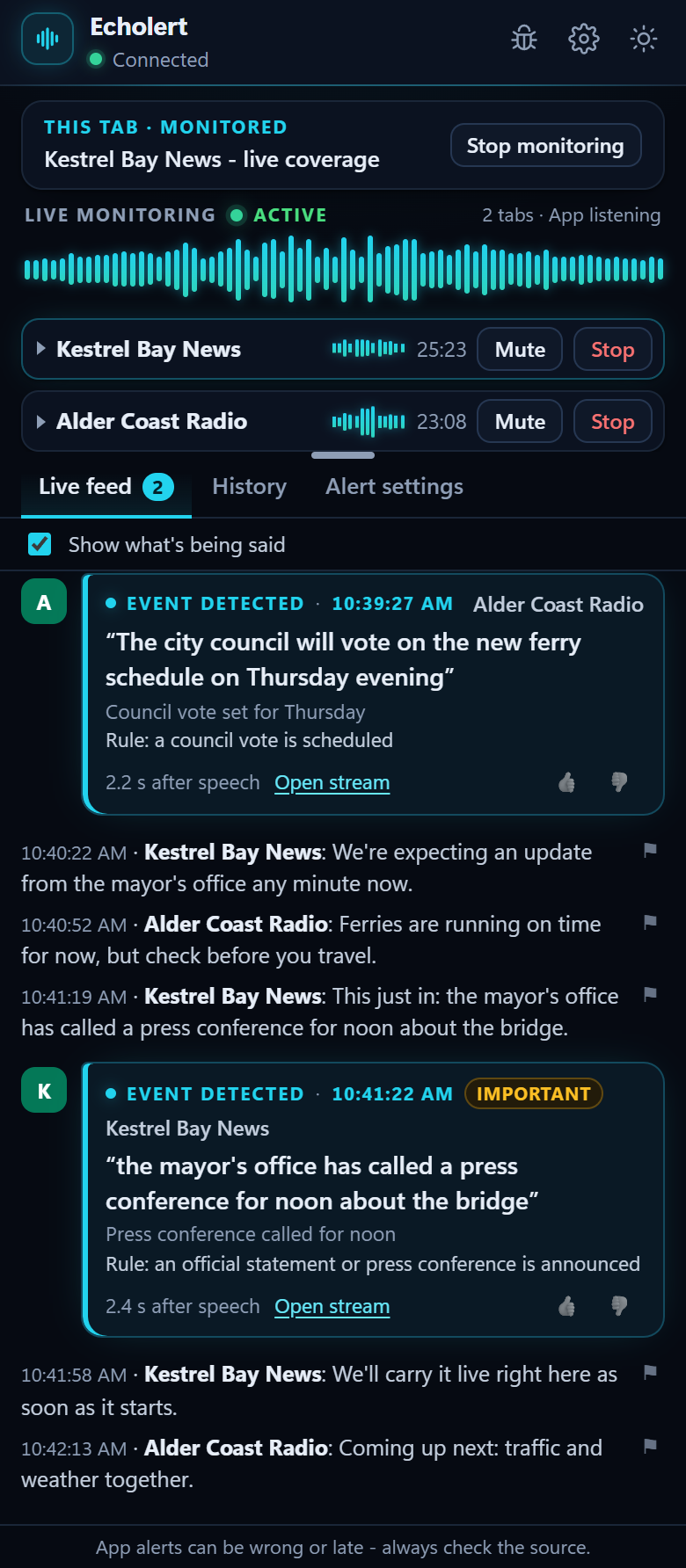
The Echolert side panel in dark mode, monitoring two news broadcasts. Its Live feed shows what is being said and two alerts that quote the words: a council vote set for Thursday, and an Important alert that the mayor's office called a press conference for noon.
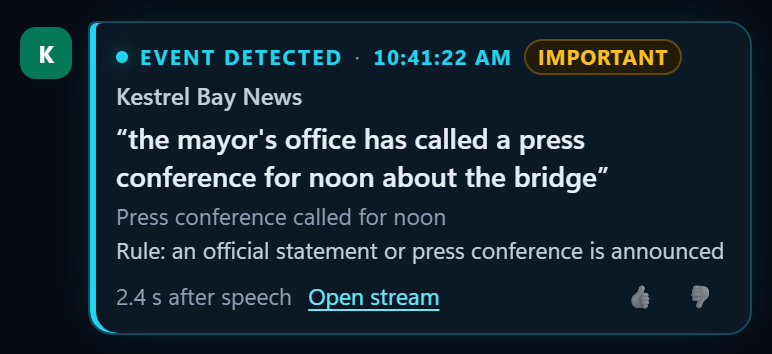
Close-up of an Important alert in the Live feed: “the mayor's office has called a press conference for noon about the bridge”, with the rule it met and a link to open the stream.
Preview build, sample data

How it works

Three steps, then it listens for you

Set it up once for each tab. Echolert keeps listening until you press Stop or close the tab, even with the side panel closed.

  1. Choose a tab

    Open a livestream, video, podcast or news broadcast in Chrome, then click the Echolert icon in the toolbar on that tab. It listens only to the tabs you choose, never to your microphone.

  2. Set your rules

    Describe your goal in plain words, then add rules that start with “Notify me when”. Mark each one Quiet, Normal or Important.

  3. Receive alerts

    When a rule is met, the side panel shows an alert that quotes the words that were said, with the time and a link back to the tab. A sound and a Windows notification follow your settings.

Demo

A 45-second walkthrough is on its way

Coming soon

Demo video - 45 seconds - coming soon

Choose a tab, set your rules, and see an alert arrive with the words that were said.

Inside the side panel

Everything happens in one calm panel

Real screenshots of the preview build, with sample data.

Your rules

Say what matters, in plain words

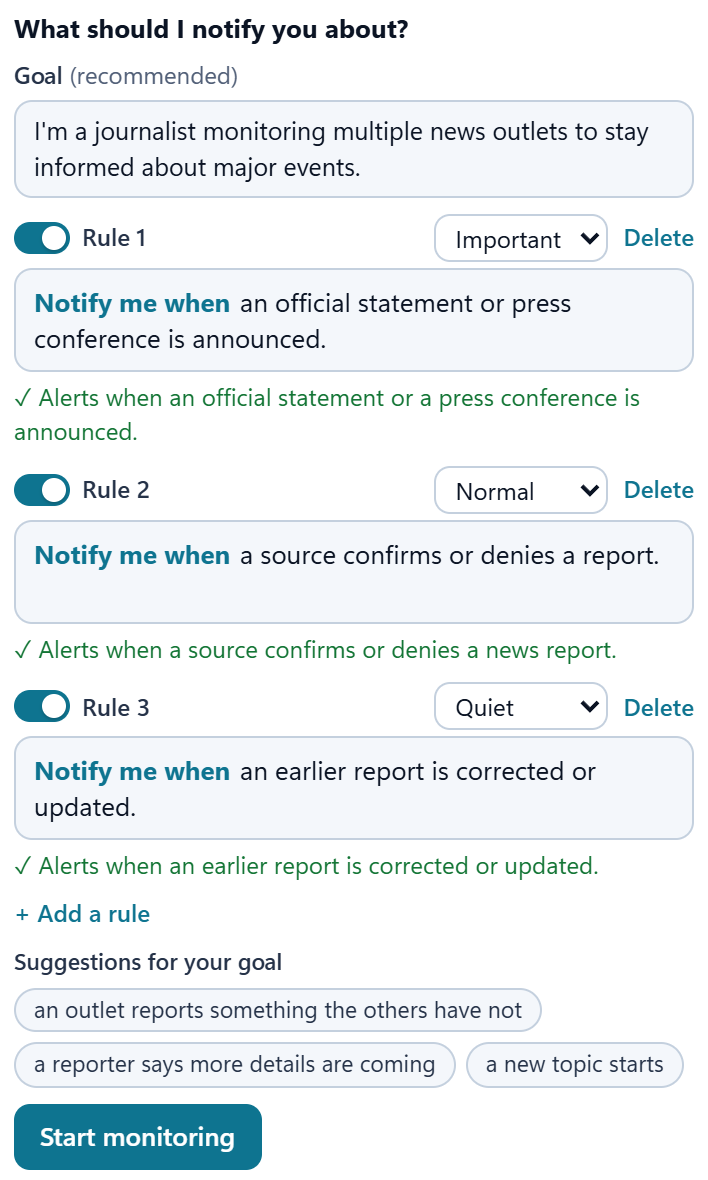
Give each tab a goal, then add up to 10 rules that start with “Notify me when”. Under each rule, the panel shows how the app understood it.

  • Quiet, Normal or Important for each rule
  • Suggested rules that refresh as you type
  • App monitoring for meaning, or My phrases for exact words
More about rules
The rules for one tab, in light mode: a journalist's goal and three rules that start with “Notify me when”, set to Important, Normal and Quiet. A check mark under each rule shows how the app understood it, and suggested rules are listed below.
Preview build, sample data

Several tabs

Several tabs, each with its own rules

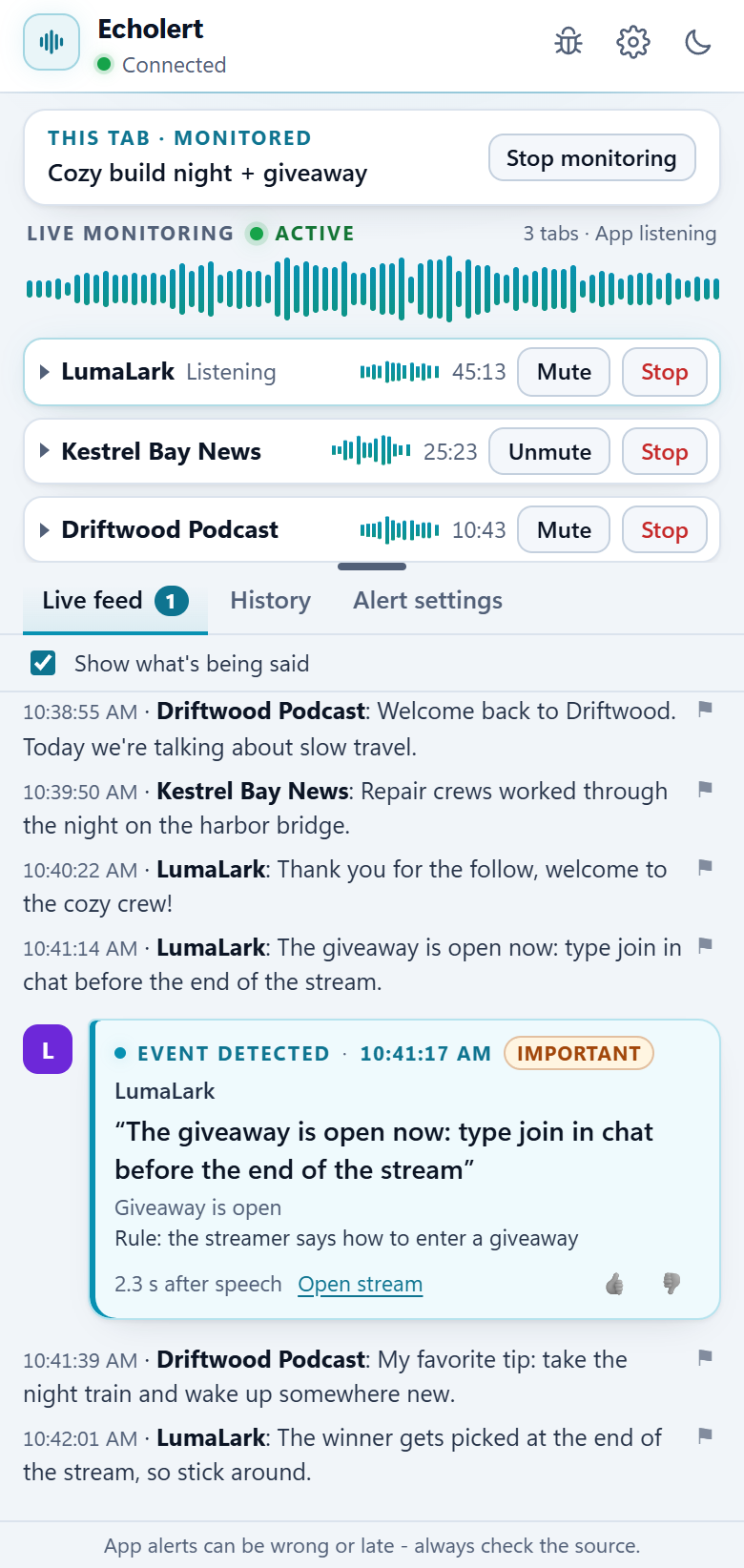
Every monitored tab gets a card with its own goal and rules, a live waveform, Mute and Stop. The big waveform follows whichever tab is loudest.

  • Muting a tab never stops the listening
  • Alerts name the rule they met and link back to the tab
  • Keeps running with the side panel closed
More about several tabs
The side panel in light mode, monitoring three tabs at once - a livestream, a news broadcast muted for you and a podcast - each with its own live waveform, Mute and Stop. The Live feed shows an Important alert: “The giveaway is open now: type join in chat before the end of the stream”.
Preview build, sample data

Alert settings

Alerts that fit how you work

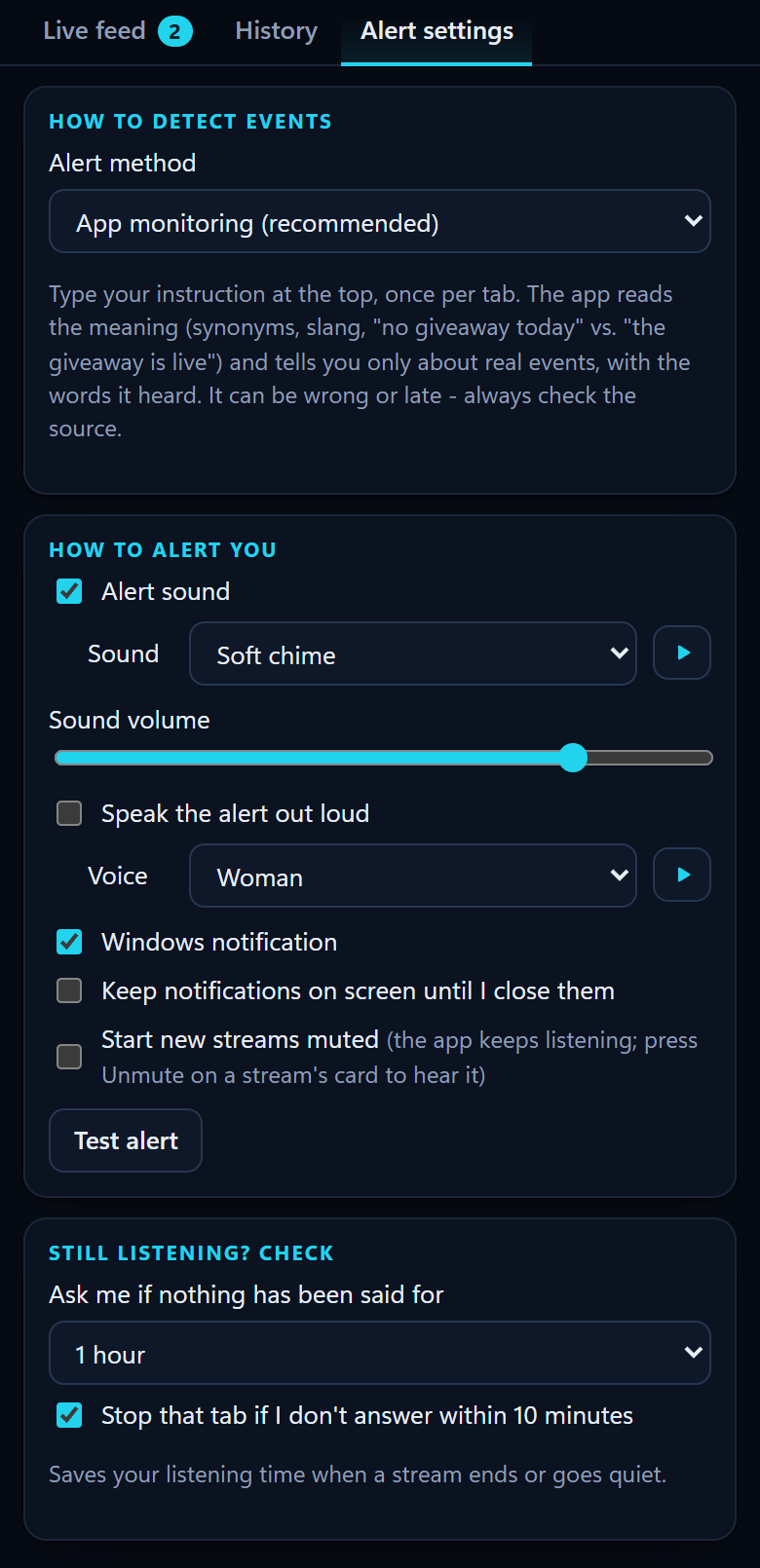
Choose how you hear about it: a soft sound, a Windows notification, a voice that reads the alert out loud, or simply a line in the Live feed.

  • Five soft alert sounds, with a volume control
  • Optional spoken alerts in a woman's or a man's voice
  • A “Still listening?” check for tabs that go quiet
More about alerts
Alert settings in dark mode: App monitoring chosen as the alert method, an alert sound (Soft chime) with a play button and a volume slider, spoken alerts with a voice choice, Windows notifications, a Test alert button and the Still listening? check, set to ask after 1 hour.
Preview build, sample data

Features

Made for hours of listening

Leave a stream playing in the background, even muted. Echolert keeps listening and tells you when it matters.

Alerts that quote the words

Every alert shows the words that were said, the time and a link back to the tab, so you can check the source in one click.

Several tabs at once

Each tab gets its own card, its own rules and a live waveform. How many tabs you can monitor at once depends on the plan.

Muting keeps the listening

Mute a tab on its card, in Chrome or in the video player: Echolert keeps listening. Stop never changes what you hear.

“Still listening?”

After an hour with nothing said, the app asks. With no answer, that tab stops, so a finished stream doesn't use up listening hours.

Sounds, notifications, voices

Five soft alert sounds, Windows notifications and optional spoken alerts in a woman's or a man's voice.

History you can filter

Your alerts stay in your browser until you clear them. Filter them by stream or by rule, and rate each one.

See all features

App alerts can be wrong or late - always check the source.

Use cases

For anyone who listens while doing something else

Echolert is general-purpose: describe the moment you care about, and it listens for it. Here are four ways to start - you can use it for many other things.

Journalists

Follow several news broadcasts at once and hear about the moment that matters.

Notify me when an official statement or press conference is announced.

Journalist examples

Livestream viewers

Keep a stream in a background tab and get a nudge when the part you're waiting for starts.

Notify me when the streamer says how to enter a giveaway.

Livestream examples

Business news

Leave a launch event or press conference playing, and hear when the company gets to the news you care about.

Notify me when the company announces its revenue numbers.

Business news examples

Sports fans

Keep a game on in another tab while you work, whatever the sport, and hear when something big happens.

Notify me when a goal is scored or the referee gives a penalty.

Sports examples

Privacy

Your audio, handled plainly

Before Echolert listens to anything, it shows a one-time notice about how your audio is handled. The main points:

Read the privacy policy (draft)

  • Only the tabs you choose. Echolert listens only to tabs you start it on, until you press Stop or close the tab, even when the side panel is closed. It never uses your microphone.
  • Speech becomes text. The audio of those tabs is sent to a third-party speech-to-text provider. Unless you use My phrases, that text is then checked against your goal and rules by a third-party analysis provider. In the planned hosted version, the audio goes through our servers first.
  • No recordings. Echolert doesn't save recordings. The providers may keep what they receive for up to 30 days to check for abuse, under their own terms.
  • Your alerts stay with you. Alerts, with the words that were said, stay in your browser until you clear them.
  • No calls or meetings. Call and meeting sites are blocked. Only monitor content you're allowed to process.
  • Change your mind anytime. Withdraw in Settings → Privacy & data. There are no ads, and your data is not for sale.

Preview

Echolert is in private preview

It isn't available to download yet, and there's nothing to sign up for. Planned pricing and answers to common questions are already here.

Desktop Chrome 123 or later · tested only on Windows 11 · English speech only